Voice dictation for macOS
Speak, and it’s typed.
Nothing leaves your Mac.
Press a shortcut, talk, and the text is pasted into the app in front of you. Your voice is transcribed by Whisper, on your own machine, offline.
macOS 14+, Apple Silicon, free
- No account
- No subscription
- No API key
- Open source
Local and private, for real
Murmure turns your voice into text, anywhere, without sending anything anywhere.
Your voice stays on your Mac
Recordings are transcribed right there, then pasted. No audio and no text ever goes online.
Whisper runs locally
whisper.cpp and the large-v3-turbo model run on your machine, offline.
Two requests, and that’s it
The model, downloaded once on first launch, then, at most once a day, the list of releases published on GitHub. Nothing is sent: no text, no audio, no identifier. MURMURE_CHECK_UPDATES=0 turns the second one off.
Nothing to sign up for or pay
No account, no subscription, no API key. The code is open, under the MIT license.
What it does
Works everywhere
Mail, Slack, a terminal, an editor, a search field: any app at all.
About 2 seconds
That’s how long it takes from the end of your sentence to the pasted text.
Tap or hold
Tap ⌘⇧E to start listening and again to transcribe. Or hold it down while you talk.
Esc to cancel
Botched it? Press Esc or the pill’s ✕ and nothing gets pasted. When Murmure isn’t listening, Esc works as usual.
Pasted where you started
Switched apps while it was transcribing? The text goes back to the one where you started dictating.
History
Your last 10 dictations in the menu; click one to copy it again. Kept on this Mac, and you can turn it off.
Settings
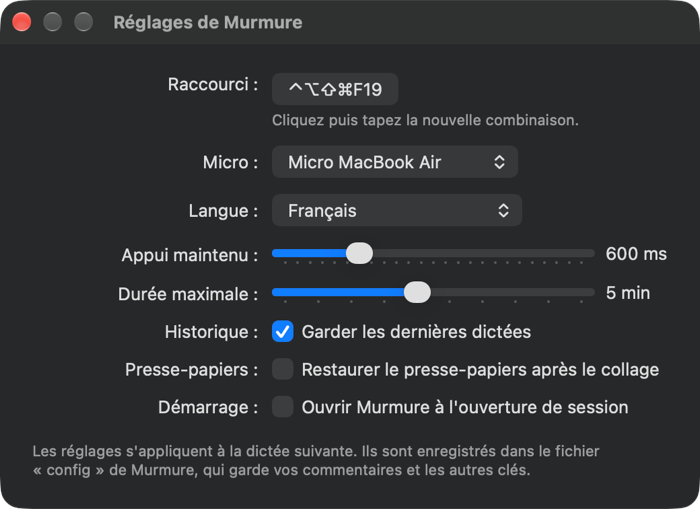
Shortcut, microphone, language, timings, history: one window, applied from your next dictation.
Vocabulary and corrections
Give Whisper your jargon up front, and fix the words it keeps mishearing afterwards.
Clipboard restored
Optionally, Murmure puts back whatever you had copied right after pasting your dictation.
Screenshots



Install
Download the app
- Download
Murmure.dmg. - Open it, drag Murmure to Applications, then launch it: its icon shows up in the menu bar.
- On first launch, Murmure offers to download its transcription model (~550 MB, just once).
Requires an Apple Silicon Mac running macOS 14 or later. Signed and notarized by Apple, the app opens without a warning and bundles everything it needs: no Homebrew, no Xcode, no terminal.
With Homebrew
brew install --cask croustibat/tap/murmureThe same app as the DMG, and it updates itself the same way.
From source
To build Murmure yourself, you need Xcode (opened once), CMake and XcodeGen; the installer sets those up with Homebrew if they’re missing.
git clone https://github.com/croustibat/murmure.git
cd murmure
./install.sh
The installer downloads the model, builds whisper-cli (whisper.cpp) and /Applications/Murmure.app, then launches it. To update, run git pull then ./install.sh.
Two permissions
Microphone
The first time you use it, macOS asks for microphone access: allow it.
Accessibility
For the text to paste itself, add
Murmure.appunder System Settings › Privacy & Security › Accessibility. Without it, the text lands on the clipboard and you press ⌘V yourself. While a permission is missing, Murmure’s menu says so and opens the right Settings pane.
You’re set: ⌘⇧E, talk, ⌘⇧E.
Updates
Murmure updates itself: once a day, it checks for a new release and installs it in one click, keeping your settings, your vocabulary, the model and the permissions.
Coming from version 1.1.0 or earlier, installed with ./install.sh? Quit Murmure, download Murmure.dmg and replace the app in Applications. Your settings, vocabulary and model are kept; macOS asks once more for the microphone and Accessibility.
FAQ
Which languages?
French by default. The Settings window also offers English, Spanish, German, Italian and automatic detection, and the config file accepts other Whisper language codes. Murmure’s own interface is in French.
Do I need Homebrew or Xcode?
No. The DMG app bundles whisper.cpp and everything else it needs. Homebrew is just another way to install it (brew install --cask croustibat/tap/murmure), and Xcode is only for building Murmure from source.
How big is the model?
About 550 MB, downloaded once by the app on first launch and checked against its SHA-256 hash. It’s only loaded into memory for the length of a dictation.
How does it update?
By itself, with Sparkle: at most once a day, Murmure reads the list of releases published on GitHub and offers the new one, which installs in one click and restarts the app, never in the middle of a dictation. “Rechercher les mises à jour…” (Check for Updates) in the menu checks right away. Coming from 1.1.0, installed with ./install.sh? Download the DMG and replace the app; your settings and model are kept.
Intel or Apple Silicon?
Apple Silicon only (M1 or later), on macOS 14 or later: the app and the whisper.cpp it bundles are built for those Macs.
How do I uninstall it?
Uncheck “Ouvrir au démarrage” (launch at login) in the menu, quit Murmure and move the app to the Trash; delete ~/.local/share/murmure to also remove your settings and the model. With Homebrew: brew uninstall --zap --cask murmure. From source: ./uninstall.sh. Then remove Murmure from the Accessibility list.
Why not use macOS dictation?
The built-in dictation is poor at punctuation, and most alternatives are paid and tied to a remote service. Murmure relies on Whisper large-v3-turbo, lets you fix the vocabulary it gets wrong, and does just one thing: voice to text, everywhere, without sending anything anywhere.
Also by Ultraviolettes
macOS tools that work on your Mac, not in the cloud.

Sillage
Your meetings leave a trace: recording, transcription and meeting notes. On your Mac.
Discover Sillage